DECYPHER projects
 KAMKAM
Phone camera for webcam and streaming
Turns your phone into a real camera for calls and live streaming: 4K capture, very low latency and a dedicated control panel on Android.
KAMKAM
Phone camera for webcam and streaming
Turns your phone into a real camera for calls and live streaming: 4K capture, very low latency and a dedicated control panel on Android.
 Menhir
Desktop media workbench
A media player, audio mixer, broadcast studio and recorder that run in sync inside one dockable workspace.
Menhir
Desktop media workbench
A media player, audio mixer, broadcast studio and recorder that run in sync inside one dockable workspace.
 Ultimate Network Manager
Network monitoring and diagnostics
Measures connection quality continuously and shows whether a problem is local or upstream.
Ultimate Network Manager
Network monitoring and diagnostics
Measures connection quality continuously and shows whether a problem is local or upstream.
 Fortece Engine
Game engine and creation studio
A standalone game engine with its own creation studio: 3D modeling, materials, sound design, animation, worlds, gameplay and visual effects in one app.
Fortece Engine
Game engine and creation studio
A standalone game engine with its own creation studio: 3D modeling, materials, sound design, animation, worlds, gameplay and visual effects in one app.
PRICE COMPARISON WEB APP · WEB · AI
PartwiseBR
PC hardware prices and builds for Brazil.
PartwiseBR compares prices for PC parts and complete builds across Brazilian stores, including the PIX price and delivery to your CEP.
An AI decision model, refined specifically for Partwise, works out what a part really costs once shipping across domestic retailers is included. The site also has interactive guides for people building their first PC.
- TYPE
- Price comparison web app
- MARKET
- Brazil
- AI
- An AI decision model refined specifically for Partwise, used to work out the total cost with shipping
- STATUS
- Available now
15-second motion piece made from Partwise's brand and catalog: the part counter, product cards, a live search and the logo
What it does
01
Explore parts
Search by model, part number or specification, filter by category and brand, and sort by price or store coverage.
02
Part details
Brazilian offers with the time each price was checked, specifications, and observed price history.
03
Tracking
Track a part to search more stores and shipping to your CEP.
04
Buying workspace
A build planner with a budget, build comparison, search alerts, and import and export.
05
Guides
Interactive guides for first-time PC builders.
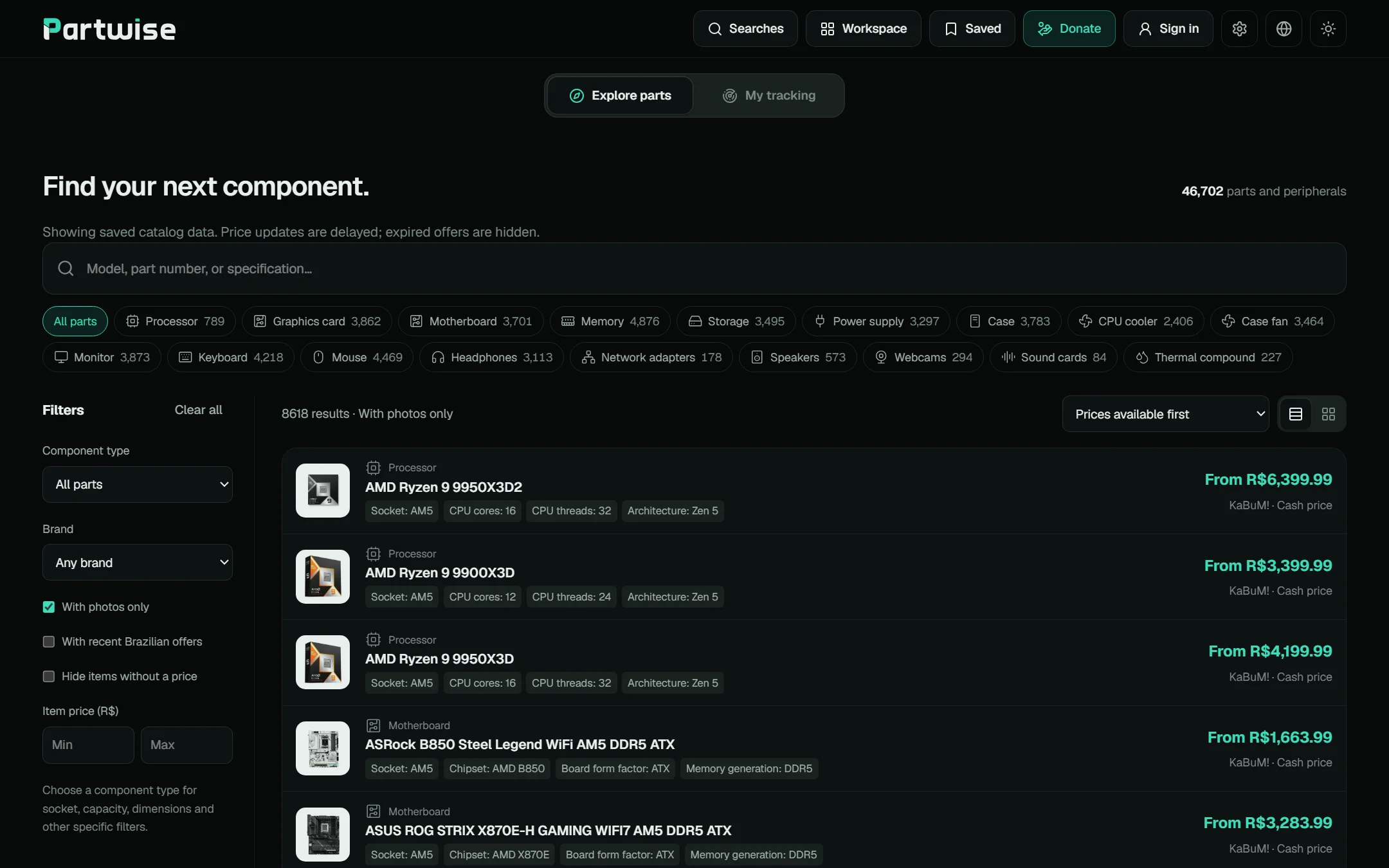
Explore parts: search, categories and prices01 / 03
Screens captured from partwisebr.com. The motion piece uses the Partwise logo, colours and real catalog data from the site.
CHROME EXTENSION · TYPESCRIPT · MV3
SnapDump
Moodboard capture, organized and local.
SnapDump is a Chrome extension for designers, illustrators and art directors who collect references. In one action it grabs the highest-resolution images available on the current page, including long and lazy-loaded pages, drops the junk and saves the rest as an organized session.
It runs on your device. There is no account and no cloud in the core path.
- TYPE
- Chrome extension (Manifest V3)
- PLATFORM
- Chrome side panel
- LANGUAGE
- TypeScript (strict)
- STACK
- Bun · no UI framework · hand-written CSS with design tokens · fflate · Web Workers
- DATA
- Local only: chrome.storage and chrome.downloads, no account, no backend
- STATUS
- In development · Alpha soon
30-second motion piece: saving images one by one, then SnapDump scanning a page, filtering, reviewing and exporting a session folder
What it does
01
Capture
Reads img, picture, srcset and useful CSS backgrounds, scrolls to load lazy content, and picks the largest real asset for each image.
02
Filter
Drops icons, tracking pixels and tiny images, prefers reference-sized images and removes obvious duplicates.
03
Review
A grid to preview, select and deselect, with filters by alt text, URL or bucket, and keyboard shortcuts.
04
Organize
Sorts images into Hero, Gallery and Details buckets with stable names and a manifest.
05
Export
Downloads a session folder or a ZIP with the same structure. Sessions can merge every open tab.
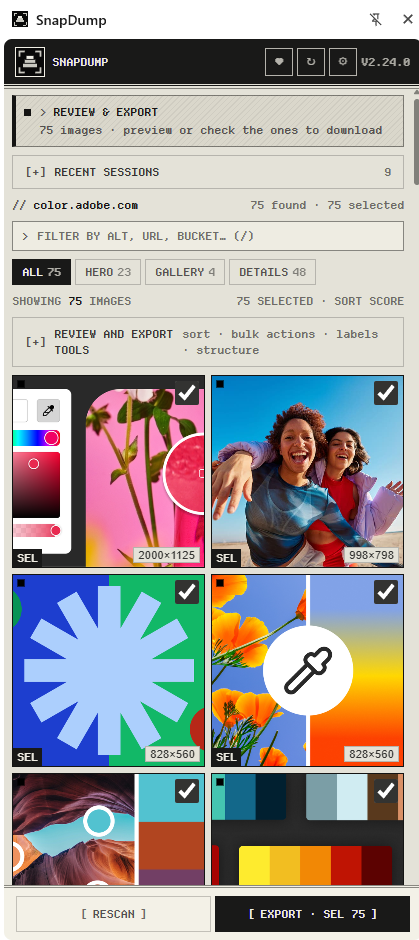
Review and export: 75 images from one page01 / 02
Heavy work off the main thread
The side panel stays smooth, the page script stays small, and resolving, scoring and zipping run in a Web Worker.
- Side panelUI, states, review grid
- Service workerJob control, downloads
- Content scriptCollect, scroll, read srcset
- Web WorkerMax resolution, score, ZIP, folders
Output
One run, one session folder.
SnapDump/
└── {host}_{yyyy-mm-dd}_{HH-mm}/
    ├── 01_hero/
    ├── 02_gallery/
    ├── 03_details/
└── manifest.jsonPHONE CAMERA FOR WEBCAM AND STREAMING · C# · C++ · KOTLIN
KAMKAM
Your phone as a real camera for webcam and streaming.
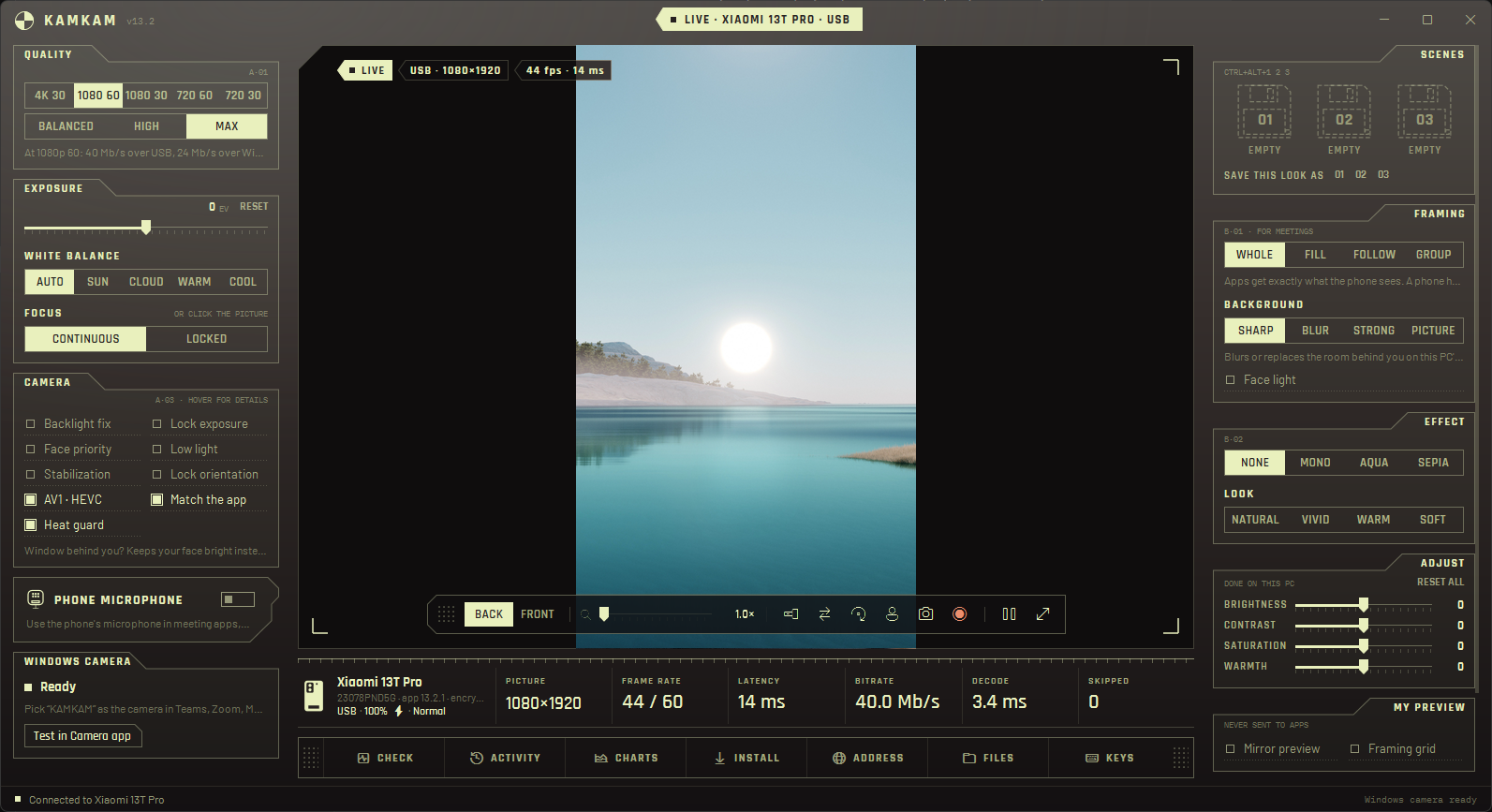
KAMKAM puts the camera you already carry to work as a real camera for calls and live streaming. It captures in 4K with the phone's own lenses, and Teams, Zoom, Meet, OBS and the Windows Camera app see it as a normal camera called KAMKAM.
Latency is very low: the phone encodes in hardware, the PC decodes on the graphics card, and the picture reaches every app at up to 1080p and 60 fps. A dedicated control panel on Android and a full control surface on Windows let you run the camera from either side, with no setup beyond opening two apps.
It links Android and Windows today, with iOS and macOS coming next.
- TYPE
- Phone camera for webcam and streaming: an Android app with its own control panel, and a Windows app
- PLATFORM
- Android 9 and later · Windows x64 and ARM64 · iOS and macOS coming
- LANGUAGE
- C#, C++ and Kotlin
- STACK
- .NET 10 · WPF · Media Foundation virtual camera · Direct3D 11 · ONNX Runtime with DirectML · Camera2 · MediaCodec
- LINK
- USB, USB tethering, Wi-Fi or Bluetooth · ECDH key exchange, AES-256-GCM
- SIZE
- ≈17,500 lines of C#, C++ and Kotlin
- STATUS
- In development · Alpha soon
KAMKAM on Windows streaming live from a phone over USB at 1080p, with camera controls, framing, scenes and link stats
What it does
01
Any route
Tries USB first, then USB tethering, Wi-Fi and Bluetooth. If a better route appears while streaming, it switches without dropping the call.
02
Meeting framing
Crops to a full 16:9 picture, follows your face as you move, or keeps a group of up to three people in the shot.
03
4K capture
At 4K 30, framing and zoom crop from a 4K picture, so the 1080p result stays sharp.
04
Background
A person-matting model runs on the PC's graphics card and blurs the room behind you or puts a picture there. Every app gets it.
05
Light
Backlight fix exposes for your face instead of the whole room. Face light adds a soft light on a dim face.
06
Phone microphone
Echo-cancelled, noise-suppressed Opus audio over the same encrypted link, held in lip sync with the picture.
07Ctrl+Alt+1 / 2 / 3
Scenes
Three slots each keep a whole look: quality, lens, zoom, framing, background, light and adjustments.
08
A second camera
Windows also gets KAMKAM 2: another lens of the same phone at the same time, or a second phone.
09
Heat guard
When the phone gets hot, KAMKAM steps down from 4K and 60 fps until it has cooled, so the camera keeps running through the call.
10
Control from both sides
A dedicated control panel in the Android app. On the PC: lens, zoom, focus, exposure, stabilization, low light and flashlight, plus brightness, contrast, saturation and warmth. Snapshots and MP4 recording.
Windows app: live from the phone over USB at 1080p, with camera, framing, scenes and link stats01 / 01
Screen captured from the Windows app with a phone connected over USB.
From lens to meeting app
Each stage runs where it is cheapest: encoding on the phone's hardware, decoding and the background model on the PC's graphics card.
- PhoneCamera2 capture, AV1, HEVC or H.264 encode
- LinkUSB, tethering, Wi-Fi or Bluetooth, encrypted
- PCGPU decode, framing, background, light
- Virtual cameraKAMKAM and KAMKAM 2 for every app
| PART | BUILT WITH |
|---|---|
| Phone app | Kotlin · Camera2 · MediaCodec |
| Windows app | C# · .NET 10 · WPF |
| Decoder and virtual camera | C++ · Media Foundation · Direct3D 11 |
| Background | Robust Video Matting · ONNX Runtime · DirectML |
| Pairing | A six-digit code on both screens, computed from the connection's keys |
| Updates | Signed updates from a Cloudflare Worker, installed when the camera is free |
DESKTOP MEDIA WORKBENCH · C++20 · DEAR IMGUI
Menhir
Media mastered in one app.
Menhir is a Windows-first media player and broadcast workbench written in C++20. It puts a media player, an audio mixer, a broadcast studio and a recorder in one window and keeps them in sync.
Every tool is a panel. You can split, stack and resize panels, keep as many open as the job needs, and save the arrangement as a layout for playback, TV, recording or studio work.
- TYPE
- Desktop media player and broadcast workbench
- PLATFORM
- Windows 10 / 11 · x64
- LANGUAGE
- C++20
- STACK
- SDL3 · Dear ImGui (docking) · FFmpeg · miniaudio · D3D11 / OpenGL · SQLite
- SERVICES
- Cloudflare Worker with D1 and Stripe for billing (TypeScript)
- SIZE
- ≈64,000 lines of C++ across 25 source modules
- STATUS
- In development · Alpha soon
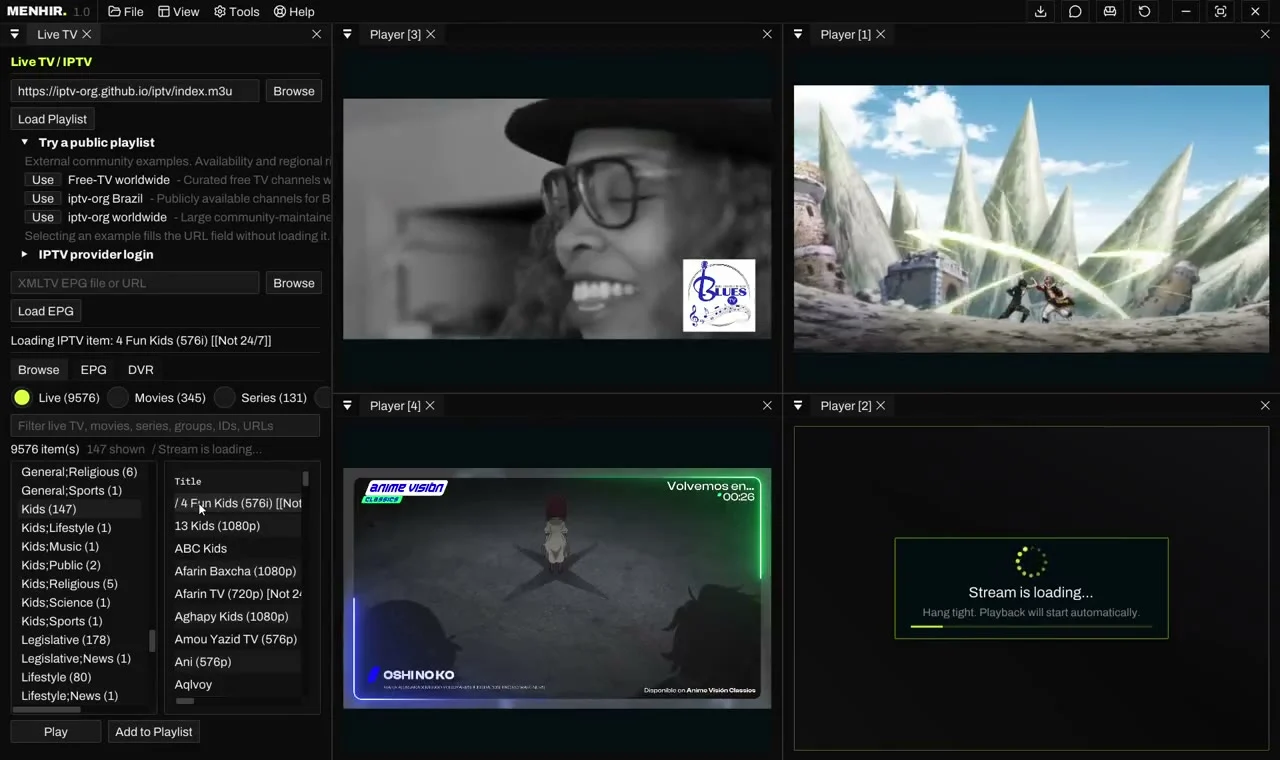
Menhir with four docked players next to the Live TV and IPTV panel
Nine subsystems
00
Playback
Picture and sound kept in step, 10-bit HDR color, and a compatibility mode for older PCs.
01
Karaoke
Synced lyrics rendered in time with the music, in their own dockable panel.
02
Audio console
One mixer for players, mics, system audio and network feeds, with EQ, effects, routing and per-input recording.
03
Studio
Scenes built from videos, cameras, browser pages, text and images, with a preview of the next scene and live transitions.
04
Docking
Split, resize and stack panels into tabs, then save layouts for different kinds of work.
05
Record
Shows, live channels, system audio and studio output, with scheduled recordings, instant replay and separate studio takes.
06
Publish
Go live to streaming platforms, or send video and music to TVs and speakers in the house.
07
Live TV
A multiview wall of channels, IPTV playlists and TV guide, pause and rewind live TV, and record any channel.
08
Live streaming
Multi-cam streamers in custom multiview panels, with live chat and emotes from every platform beside the players.
Four docked players next to the Live TV and IPTV panel01 / 04
25 source modules
The C++ source is split into modules, each with its own README. Grouped by what they do:
PLAYBACK AND MEDIA
- Core mediaPlayer, decoder, subtitles, lyrics, capture
- RendererOpenGL / D3D11 frame upload
- Audiominiaudio output, mixer buses, recording
- LibrarySQLite media library and metadata
- DevicesDirectShow devices and optical discs
BROADCAST
- StudioScene document model
- Stream publishingRTMP, SRT, WHIP, NDI targets
- OBS bridgeOBS-compatible websocket control
- CastingDLNA, Chromecast, AirPlay
- ChatTwitch, Kick and YouTube chat
- EffectsNVIDIA Maxine runtime
TV AND SHARING
- TV / DVRIPTV, XMLTV, DVR, timeshift
- SyncWatch Together host and relay
ACCOUNTS AND SERVICES
- AccountsYouTube and Kick OAuth
- Twitch accountDevice authorization
- BillingSubscription state client
- NetworkHTTP client and ranged file server
APPLICATION
- App shellSDL / ImGui / D3D11 bootstrap, updater
- UIDockable panels and layout state
- SettingsJSON settings
- PluginsManifests, registry, marketplace
- InternationalizationUTF-8 JSON catalogs
- SecurityCredential Manager and DPAPI
- PrivacyText and URL redaction
- UtilitiesLogging
NETWORK MONITORING AND DIAGNOSTICS · RUST · DIOXUS
Ultimate Network Manager
Is the connection healthy, and if not, where does it break?
Ultimate Network Manager measures latency, jitter, packet loss and gateway response continuously. Comparing the router with an internet target shows whether a problem is on the local Wi-Fi, router or cabling, or further upstream at the provider.
Samples, outages, alerts and speed tests survive restarts and export to CSV or a standalone HTML report. Every value on screen is a real measurement.
- TYPE
- Network observability and diagnostics
- PLATFORM
- Windows, macOS, Linux, Android and iOS
- LANGUAGE
- Rust (2024 edition)
- STACK
- Dioxus 0.7 · Tokio · reqwest · surge-ping · windows-sys (IP Helper, WLAN, ETW)
- SIZE
- ≈27,200 lines of Rust in 72 files
- STATUS
- In development · Alpha soon
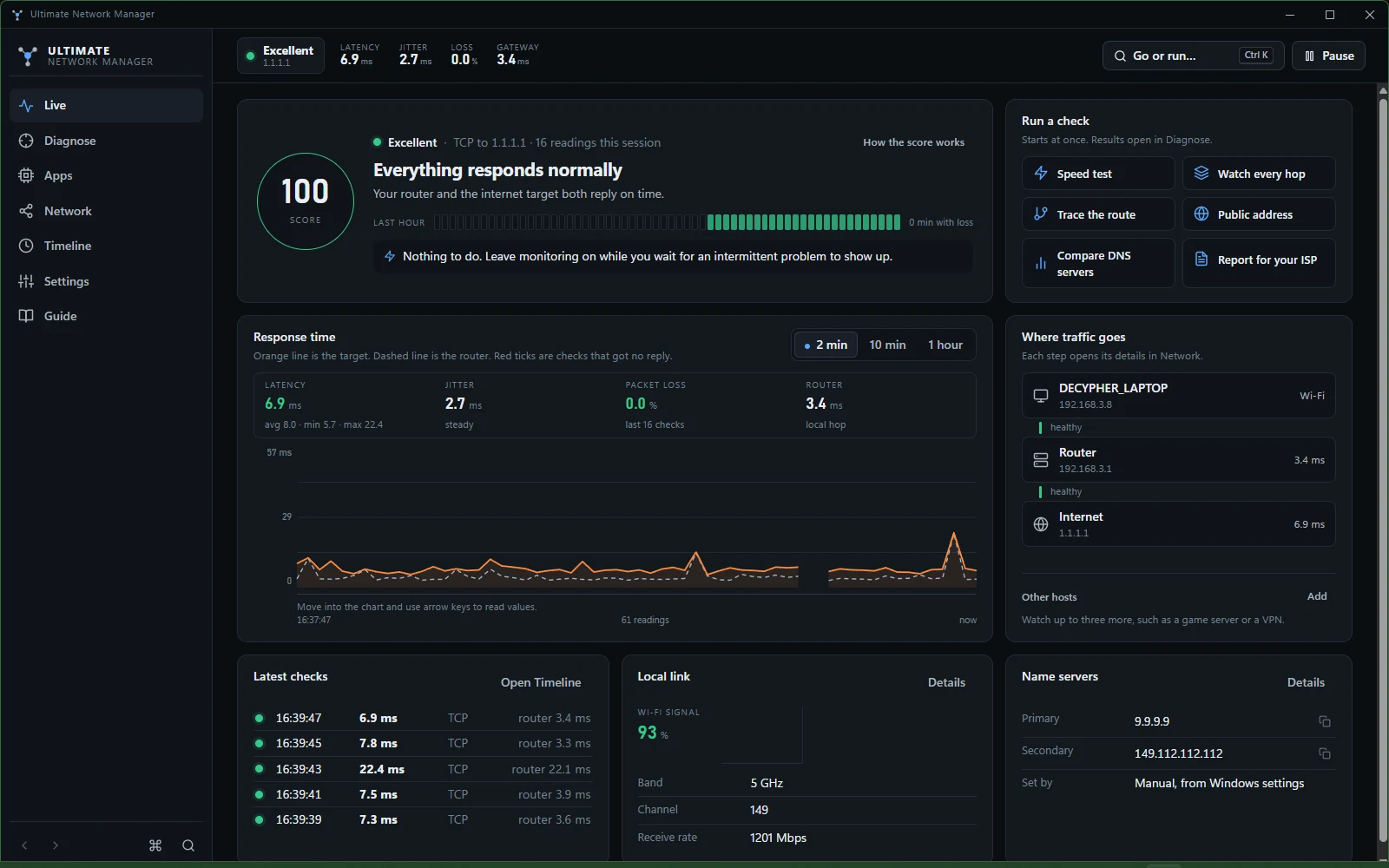
Ultimate Network Manager Live view with a health index of 100, the response-time chart and the path from device to router to internet
Seven sections
01Ctrl+1
Live
A verdict in words, a score, the last hour, the path from device to router to internet, and a response-time chart.
02Ctrl+2
Diagnose
A layered checkup with repairs, a graded speed test on Measurement Lab servers, DNS lookup and benchmark, traceroute, path monitoring, port checks and public IP.
03Ctrl+3
Apps
Searchable TCP and UDP traffic per app, with connections and recoverable firewall controls.
04Ctrl+4
Network
Device, link, router, DNS and internet laid out as one path, nearby Wi-Fi with channel advice, and every device on the network.
05Ctrl+5
Timeline
One period for every number: outages, alerts, test results, network changes, comparisons, CSV and HTML.
06Ctrl+6
Settings
Monitoring, alerts, speed endpoints, display, data and updates on one page.
07Ctrl+7
Guide
A plain-language glossary, first checks and the keyboard reference.
Live: verdict, health index, response time and the path to the internet01 / 07
Screens captured on Windows.
One app, five platforms
Conditional compilation keeps one application model across operating systems. An excerpt of the capability matrix:
| CAPABILITY | WINDOWS | MACOS | LINUX | ANDROID / IOS |
|---|---|---|---|---|
| Passive monitoring | ICMP, TCP fallback | ICMP, TCP fallback | ICMP, TCP fallback | TCP timing |
| Speed test, DNS tools, port check | Yes | Yes | Yes | Yes |
GAME ENGINE AND CREATION STUDIO · C++ · DIRECT3D 12
Fortece Engine
Every tool a game needs, inside one engine.
Fortece is a standalone game engine written in C++, with a complete creation studio built into it. Everything a game is made of is created in the same app: 3D models, materials, sound, animation, worlds, gameplay, visual effects and interfaces.
Studio has twelve modules that work on one shared world. Build a level, model a prop, give it a material and a sound, animate a character, write its gameplay, then press F5 to play it on the engine's own renderer and package it as a standalone Windows game.
The engine owns everything that matters: content, simulation and rendering run natively on Direct3D 12. The studio interface sits on top as HTML panels, with the engine's GPU viewports composed underneath them.
- TYPE
- Standalone game engine with an integrated creation studio
- PLATFORM
- Windows x64
- LANGUAGE
- C++ engine · HTML, CSS and JavaScript editor
- STACK
- Direct3D 12 · DirectComposition · WebView2 · CMake
- SIZE
- ≈81,000 lines of engine C++, 14,000 lines of editor code, 29,000 lines of tests
- HISTORY
- 1,225 commits
- STATUS
- In development · Alpha soon
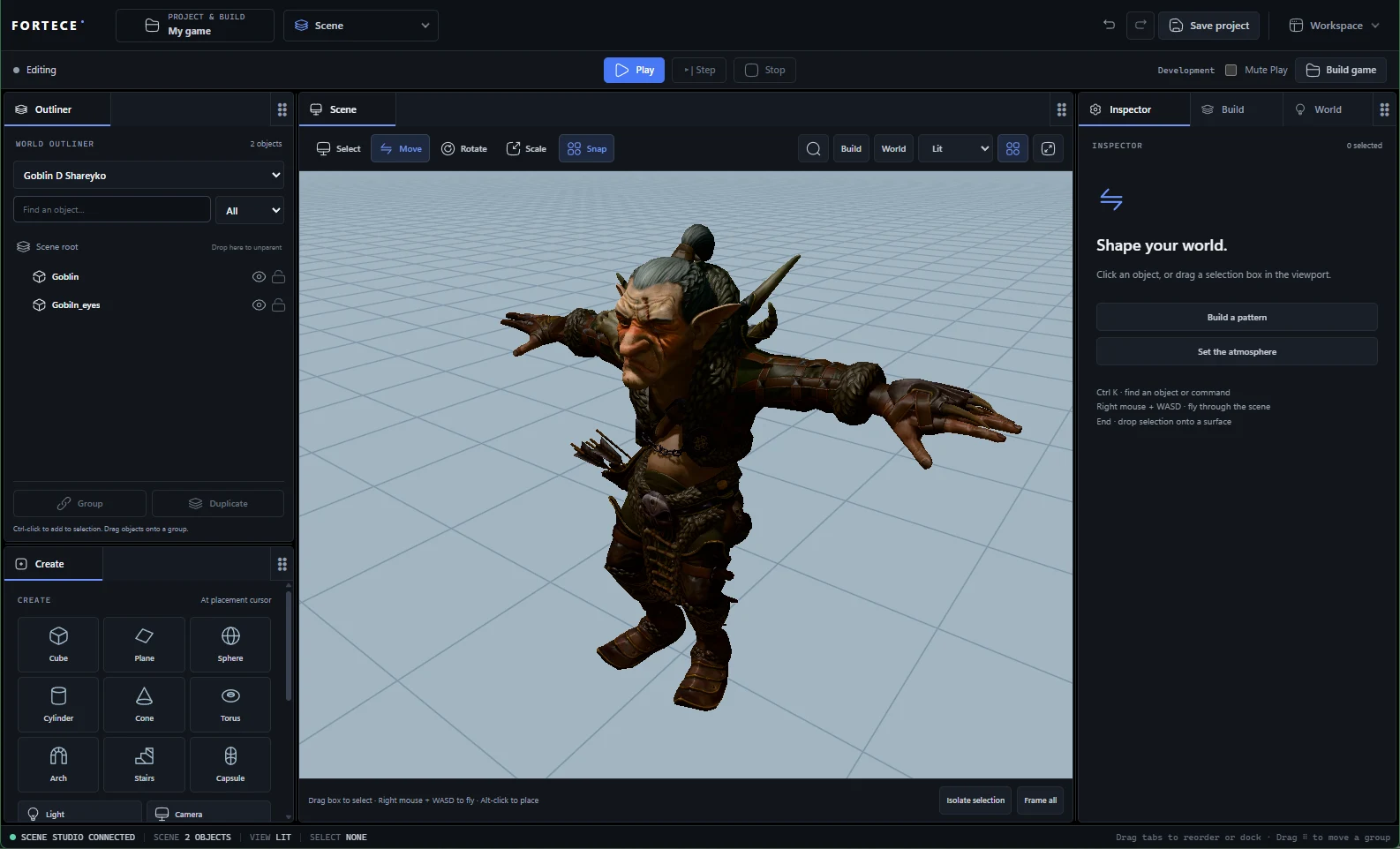
Fortece Studio Scene module with an imported character in the native viewport
Twelve modules
01
Scene
Build worlds from primitives, lights, cameras and player starts. Drop objects onto real surfaces, scatter patterns, organize the hierarchy and reuse whole assemblies.
02
Modeling
A full mesh editor: 18 base shapes, vertex, edge and face editing, edge loops and mesh tools. UVs and skin weights survive every edit.
03
Materials
Physically based surfaces from thirty node-graph recipes, imported texture sets and linked instances, with a live GPU preview.
04
SFX
A sound design studio with piano, keys, pad, lead, bass, pluck, bell and chip instruments, twelve effect recipes, MIDI input and a phrase recorder.
05
Animations
Pose and key rigs, build custom skeletons, drag a hand or foot and let IK solve the rest, compose clips and fire gameplay events.
06
Gameplay
Game logic as readable When / If / Do behaviors, with characters, inventory, abilities, objectives and NPCs that navigate, perceive and patrol.
07
VFX
30 effect bases, from campfires and lightning to volumetric explosions, with native gas and liquid simulation, ribbons, beams and mesh particles.
08
UI Studio
Menus and HUDs designed like in a design tool: auto layout, components and variants, themes, data bindings and motion.
09
Assets
Import Mixamo, FBX and glTF characters, attach animation batches, then search, tag and place everything from one library.
10
Play & Debug
Run the game with native rendering, input, collision, audio and UI, then pause, step and inspect it live.
11
Project & Build
Set controls, quality, saves and profiles, then package and launch a standalone Windows game.
12
AI
A Studio chat connected to provider APIs and the native authoring tools, with validated edits and undo.
Scene: an imported character in the native viewport01 / 08
Screens captured from Fortece Studio running on Windows with its native viewports.
Where the work happens
The browser handles panels, gestures and presentation. C++ validates and executes every change against one world.
- BrowserPanels, gestures, presentation
- C++Validation, authoring, execution
- WorldOwned asset data, undo, replay
- CheckpointSaved project
Return path: C++ sends snapshots, material pixels and sound samples back to the browser.
| ENGINE AREA | WHAT IT COVERS |
|---|---|
| World | Stable entity IDs, typed columns, transactions, relations, undo, replay and persistence |
| Runtime APIs | Gameplay, input, physics, animation, audio, VFX, UI and render-graph contracts |
| Renderer | Direct3D 12 with PBR materials, GGX lighting, shadows, HDR, bloom, depth of field, TAA and DLAA, GPU-driven culling, ray tracing and temporal reconstruction |
| Physics | Rigid bodies, 64 collision layers, triggers, hinges, sliders, motors, springs and continuous collision |
| Navigation | NPC pathfinding with A*, perception and patrols, plus reciprocal crowd avoidance |
| Content tools | Asset identity, native readers, reimport, deterministic cook and SDK packaging |
| Game sample | Fox Trail: an animated fox, capsule movement, collection and scene transitions |
About
I'm a French developer based in Brazil.
Each project started as something I needed. I polished them so other people could use them: native apps, engines and web.
Coverage
Layers of the stack each project touches.
| PROJECT | NATIVE CODE | GPU RENDERING | DESKTOP UI | BROWSER | WEB SERVICES | AI |
|---|---|---|---|---|---|---|
| PartwiseBR | ||||||
| SnapDump | ||||||
| KAMKAM | ||||||
| Menhir | ||||||
| UNM | ||||||
| Fortece Engine |
Toolbelt
- C++20
- C#
- Rust
- Kotlin
- TypeScript
- JavaScript
- Direct3D 12
- D3D11 / OpenGL
- Dear ImGui
- SDL3
- Dioxus
- FFmpeg
- WebView2
- WPF
- Media Foundation
- DirectML
- Android Camera2
- WebExtensions
- Bun
- Cloudflare Workers
- SQLite
Contact
Open to collaborations and professional inquiries.